29 NOV 2019

sql2

We got familiar with Data Base Management System (DBMS) and the Relational Data Base Management System (RDBMS). we explored what is SQL? and what is its purpose. we talked about the difference between SQL and noSQL databases. we downloaded the SQLite DB Browser and created our first DB using SQL queries.

nosql

SQL commands

  • Create Table:
    CREATE TABLE COMPANY(
       ID INT PRIMARY KEY     NOT NULL,
       NAME           TEXT    NOT NULL,
       AGE            INT     NOT NULL,
       ADDRESS        CHAR(50),
       SALARY         REAL
    );
  • Insert Row:
    INSERT INTO COMPANY (ID,NAME,AGE,ADDRESS,SALARY)
    VALUES (1, 'Paul', 32, 'California', 20000.00 );
  • Update Row(s):
    UPDATE COMPANY SET ADDRESS = 'Texas' WHERE ID = 6;
  • Delete Row(s):
    DELETE FROM COMPANY WHERE ID = 7;

    More SQLite – Tutorials point

sqlite.png

DB browser for SQLite – download link

More topics covered:

  • Advantages of using DBMS
  • Advantages of using RDBMS
  • DB in JSON format   { key : value }
  • DB normalization rules
  • Additional data bases: MySQL, MongoDB, PostgreSQL, etc.
  • noSQL usages
  • Auto Increment
  • Not-Null
  • SQLite data types

Links:


22 NOV 2019

rest.PNG

REST- Representational state transfer (REST) is a software architectural style that defines a set of constraints to be used for creating Web services. Web services that conform to the REST architectural style, called RESTful Web services (RWS), provide interoperability between computer systems on the Internet. RESTful Web services allow the requesting systems to access and manipulate textual representations of Web resources by using a uniform and predefined set of stateless operations.
In a RESTful Web service, requests made to a resource’s URI will elicit a response with a payload formatted usually in JSON. The response can confirm that some alteration has been made to the stored resource, and the response can provide hypertext links to other related resources or collections of resources. When HTTP is used, as is most common, the operations (HTTP methods) available are GET, HEAD, POST, PUT, PATCH, DELETE, CONNECT, OPTIONS and TRACE
By using a stateless protocol and standard operations, RESTful systems aim for fast performance, reliability, and the ability to grow by reusing components that can be managed and updated without affecting the system as a whole, even while it is running.

Postman is one of the most popular tools used in API testing. it can simulate a GET POST PUT DELETE request in a single button click

JSONPlaceholder is a free online REST API that you can use whenever you need some fake data. It’s great for tutorials, testing new libraries, sharing code examples

Flask

  • Creating web service in flask
  • Implementing REST in flask

More topics covered:

  • using postman with flask
  • @app.route methods
  • flask debug
  • get method type
  • consuming web service in python code
  • making POST request in python code

Links:

15 NOV 2019

flask.png

What is Flask?

Flask is a micro web framework written in Python. It is classified as a microframework because it does not require particular tools or libraries. It has no database abstraction layer, form validation, or any other components where pre-existing third-party libraries provide common functions. However, Flask supports extensions that can add application features as if they were implemented in Flask itself. Extensions exist for object-relational mappers, form validation, upload handling, various open authentication technologies and several common framework related tools. Extensions are updated far more frequently than the core Flask program.
Applications that use the Flask framework include Pinterest, LinkedIn, and the community web page for Flask itself.

More topics covered:

  • @app.route
  • parameters
  • template + static
  • html from template
  • redirect
  • url_for
  • render_template
  • python code inside HTML
  • form submitting
  • input type number, text, date, etc.

Links:


08 NOV 2019

htmlcss3

What is HTML?

HTML stands for Hypertext Markup Language. It allows the user to create and structure sections, paragraphs, headings, links, and blockquotes for web pages and applications.
HTML is the standard markup language for Web pages
HTML elements are the building blocks of HTML pages
HTML elements are represented by <> tags
The three block level tags every HTML document needs to contain are:
The  html  tag is the highest level element that encloses every HTML page.
The  head  tag holds meta information such as the page’s title and charset.
Finally, the  body tag encloses all the content that appears on the page.

htmlcode.PNG

What is CSS?

CSS stands for Cascading Style Sheets with an emphasis placed on “Style.” While HTML is used to structure a web document (defining things like headlines and paragraphs, and allowing you to embed images, video, and other media), CSS comes through and specifies your document’s style—page layouts, colors, and fonts are all determined with CSS.
External stylesheets are stored in CSS files

css1.PNG

Example:

css2.jpg

Whats is Visual Studio Code (VSCode)?

vscode

Visual Studio Code is a source-code editor developed by Microsoft for Windows, Linux and macOS. It includes support for debugging, embedded Git control and GitHub, syntax highlighting, intelligent code completion, snippets, and code refactoring. It is highly customizable, allowing users to change the theme, keyboard shortcuts, preferences, and install extensions that add additional functionality. The source code is free and open source and released under the permissive MIT License. The compiled binaries are freeware and free for private or commercial use.
Visual Studio Code is based on Electron, a framework which is used to deploy Node.js applications for the desktop running on the Blink layout engine.

VSCode Home Page link

More topics covered:

  • Loading html pages from local hard drive
  • Embed CSS styles into HTML page: inline, style tag, file
  • What is Markup language?
  • VSCode loading from CMD using “code”
  • VSCode – “!” shortcut
  • HTML semantics
  • CSS selectors
  • HTML Tags: b, u, i, p, div, a, hr, h1..h6, img, ul, ol, li, br, btn
  • What is Bootstrap?
  • Developer tools – clicking F12 in Chrome
  • w3schools

Links:


01 NOV 2019

Error Detection and Corrections:
– Communication and Error Detection
– “card magic” – matrix of bits for sending images, or other data
– XOR, in logics and in python
– XOR for ints – what does it mean?
– Code for parity checking in 2d matrix
– Israeli ID – finding & checking the last digit
– RAID – how to backup many Hard disks using single disk with parity checks
  (no implementation)
– Nearest neighbor for detecting errors in strings (e.g. spell checker) – no implementation

Image Processing:
– Introduction – pixels for representing images, bit depth
– the class matrix, drawing pixles, lines and functions
– displaying the images with plt library
– drawing boxes with different colors

Links:

25 OCT 2019

Multithreaded program contains two or more parts that can run concurrently and each part can handle a different task at the same time making optimal use of the available resources specially when your computer has multiple CPUs.
A process is an executing instance of an application. for example, when you double-click the Microsoft Word icon, you start a process that runs Word. A thread is a path of execution within a process. Also, a process can contain multiple threads. When you start Word, the operating system creates a process and begins executing the primary thread of that process. It’s important to note that a thread can do anything a process can do. But since a process can consist of multiple threads, a thread could be considered a ‘lightweight’ process. Thus, the essential difference between a thread and a process is the work that each one is used to accomplish. Threads are used for small tasks, whereas processes are used for more ‘heavyweight’ tasks – basically the execution of applications.

More topics covered:

  • threading library
  • urllib.request library
  • urllib.request download from web using urlretrieve
  • daemon thread
  • thread.isAlive
  • daemon thread
  • thread.name
  • Thread target, args = (x,)
  • threading.currentThread()
  • urllib.request.urlopen(url).info().get(content-length)

Links:

04 OCT 2019

Grid: Grid geometry manager puts the widgets in a 2-dimensional table. The master widget is split into a number of rows and columns, and each “cell” in the resulting table can hold a widget … full article

grid1.PNG

Entry validation: to restrict the characters that can be typed into an entry widget, only numbers for instance, a validate command can be added to the entry. A validate command is a function that return True if the change is accepted, False otherwise. This function will be called each time the content of the entry is modified full article

Radio button: the Radiobutton is a standard Tkinter widget used to implement one-of-many selections. Radiobuttons can contain text or images, and you can associate a Python function or method with each button. When the button is pressed, Tkinter automatically calls that function or method. The button can only display text in a single font, but the text may span more than one line. In addition, one of the characters can be underlined, for example to mark a keyboard shortcut. By default, the Tab key can be used to move to a button widget … full article

Listbox: the Listbox widget is a standard Tkinter widget used to display a list of alternatives. The listbox can only contain text items, and all items must have the same font and color. Depending on the widget configuration, the user can choose one or more alternatives from the list … full article

Bind: tkinter provides a powerful mechanism to let you deal with events yourself. For each widget, you can bind Python functions and methods to events … full article

widget.bind(event, handler)

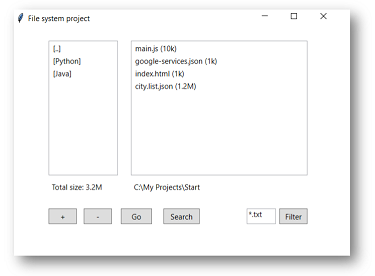
Project II – file manager:

fileman2.png

click here to download the project

More topics covered:

  • Entry can use var such as StringVar 
  • Entry trick to notice text change
  • RadioButton set indicatoron=0
  • Listbox – selected items
  • Listbox – add remove
  • Listbox – mouse mouse

Links:

27 SEP 2019

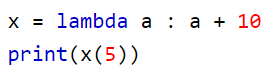
Lambda functions: Python allows you to create anonymous function i.e function having no names using a facility called lambda function. lambda functions are small functions not more than a line. It can have any number of arguments just like a normal function. The body of lambda functions is very small and consists of only one expression. The result of the expression is the value when the lambda is applied to an argument. Also there is no need for any return statement in lambda function.

lambda1

filter1

map1

The Variable Classes (BooleanVar, DoubleVar, IntVar, StringVar)
You can ask the system to let you know when a variable is changed. The Tk toolkit can use this feature, called tracing, to update certain widgets when an associated variable is modified. or modify the value your self … full artice

More topics covered:

  • lambda with multiple arguments
  • lambda expression into tkinter
  • import time and time.ctime()
  • placing window widget on self

Links:

13 SEP 2019

At the class level, variables are referred to as class variables (static data), whereas variables at the instance level are called instance variables. When we expect variables are going to be consistent across instances, or when we would like to initialize a variable, we can define that variable at the class level. When we anticipate the variables will change significantly across instances, we can define them at the instance level. Defined outside of all the methods, class variables are, by convention, typically placed right below the class header and before the constructor method and other methods.

class_var.PNG

staticmethod (@staticmethod) is a method that knows nothing about the class or instance it was called on. It just gets the arguments that were passed, no implicit first argument. 

classmethod (@classmethod), is a method that gets passed the class it was called on, or the class of the instance it was called on, as first argument. This is useful when you want the method to be a factory for the class: since it gets the actual class it was called on as first argument, you can always instantiate the right class, even when subclasses are involved. Class methods are also used as an alternative constructors- for example from_string which creates as instance of the class from a string variable

TKinter: is the Python GUI toolkit. Tkinter is included with standard Linux, Microsoft Windows and Mac OS X installs of Python.

tkinter_code.PNG

tkinter.PNG

More topics covered:

  • static data
  • static – without self
  • static – fromlist
  • TKinter fonts
  • TKinter button styles
  • TKinter Implement a window class
  • mainloop – blocking method

Links:

06 SEP 2019

OS functions: 
getcwd – get current working directory
chdir – change current directory 
listdir – print all files in current directory
makedirs – create folders (and sub folder) 
mkdir – create folder (without sub folder)
stat.st_mtime – get file last modification time
stat.size – get file size
walk – get all files, folders in a folder (recursion)
getenv – get system variables (i.e. PATH)
startfile – start a process
path.isfile – check if a path is a file
path.isdir – check if a path is a directory
path.exists – check if a path exists or not
os.path.join – combine a folder name with a file name
os.path.splitext – separates file name from its extension

shutil library: 
rmtree – remove folder and all of its context

psutil library:
process_iter – get all processed

datetime library:
now – get the current date and time
fromtimestamp – converts a time stamp into a date time

More topics covered:

  • Task manager
  • Running os command from shell
  • static variables introduction

Links: