
Grid: Grid geometry manager puts the widgets in a 2-dimensional table. The master widget is split into a number of rows and columns, and each “cell” in the resulting table can hold a widget … full article

Entry validation: to restrict the characters that can be typed into an entry widget, only numbers for instance, a validate command can be added to the entry. A validate command is a function that return True if the change is accepted, False otherwise. This function will be called each time the content of the entry is modified full article
Radio button: the Radiobutton is a standard Tkinter widget used to implement one-of-many selections. Radiobuttons can contain text or images, and you can associate a Python function or method with each button. When the button is pressed, Tkinter automatically calls that function or method. The button can only display text in a single font, but the text may span more than one line. In addition, one of the characters can be underlined, for example to mark a keyboard shortcut. By default, the Tab key can be used to move to a button widget … full article
Listbox: the Listbox widget is a standard Tkinter widget used to display a list of alternatives. The listbox can only contain text items, and all items must have the same font and color. Depending on the widget configuration, the user can choose one or more alternatives from the list … full article
Bind: tkinter provides a powerful mechanism to let you deal with events yourself. For each widget, you can bind Python functions and methods to events … full article
widget.bind(event, handler)
Project II – file manager:
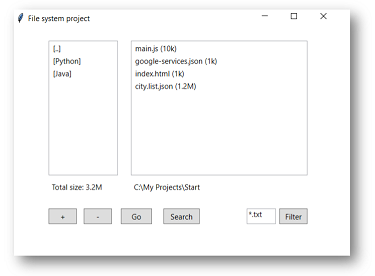
click here to download the project
More topics covered:
- Entry can use var such as StringVar
- Entry trick to notice text change
- RadioButton set indicatoron=0
- Listbox – selected items
- Listbox – add remove
- Listbox – mouse mouse
Links:

 Python World